


Bringing a chatbot to a website is a matter of minutes today. A small script in the source code, and the bot appears as a speech bubble in the corner. This simplicity hides the questions that determine success or frustration: In what format does the bot appear, what does the script do to the loading time, and where is the data located. Anyone who clarifies these points before integration saves themselves the trouble of subsequent adjustments.
Integrating the chatbot in just a few lines
Technically, a modern chatbot integrates via a JavaScript snippet. You copy a short piece of code into your page's source code and load it using your content management system or a tag manager. The bot places itself as an overlay on the page, so visitors can have a dialogue without leaving the page. At Volkswagen Bank, the team describes the implementation like this: integration into the websites is straightforward and does not require extensive technical expertise.
The snippet is the fastest way. For use cases that reach deeper into an application, a connection via API is available, with which the bot can be integrated into a web app or a customer portal.
Widget, overlay, or inline: which format fits
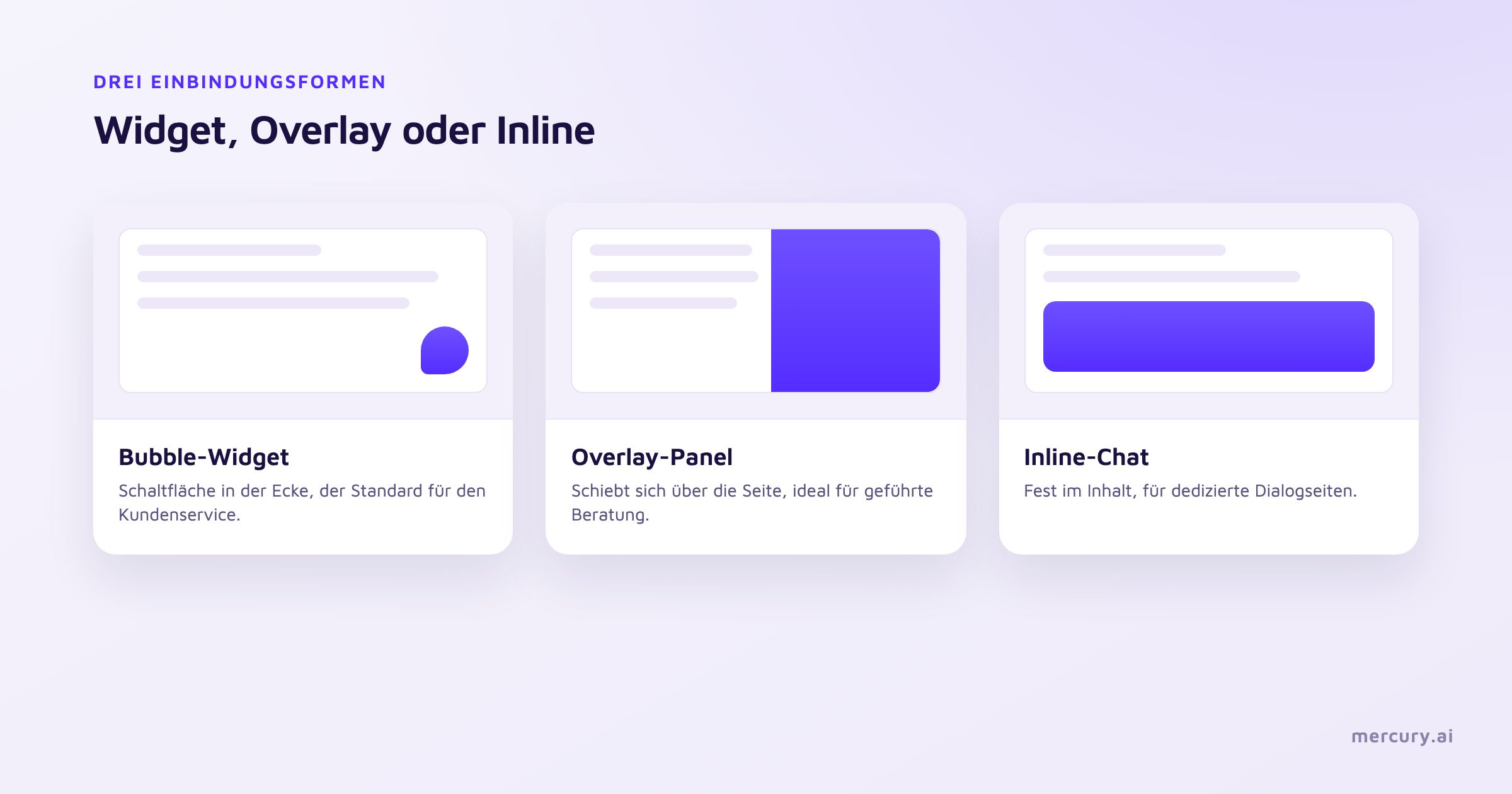
Integration has three typical basic formats that differ in appearance.
The Bubble Widget sits as a round button in a corner and opens a chat window when clicked. It is the most common format because it works on any page and does not displace content.
The Overlay Panel slides over part of the page as soon as the dialogue starts. It gives the conversation more space and is suitable when the bot is conducting complex advice.
The Inline Chat sits firmly within the page content, such as on a contact or product page. It invites dialogue without the visitor having to look for a button, and fits where the dialogue is the actual purpose of the page.
Which format fits depends on the intent. For broad customer service, the Bubble Widget is the standard; for guided advice, the overlay is worthwhile; for a dedicated dialogue page, the inline chat.
Why loading performance determines success
This is the point that many integrations overlook. Chat widgets are among the heavier scripts that a website loads. A synchronously loaded widget can be a blocking script for a function that most visitors never open. The result is slower pages and poorer Core Web Vitals, which Google includes in its evaluation.
The solution is called lazy loading. The bot only loads when the visitor interacts with the page, such as during the first scroll, a mouse movement, or a touch. For anyone who is just stopping by briefly, the script does not load at all.
A chatbot that slows down the page costs more customers than it wins in the chat.
Therefore, actively ask a provider how their widget loads. A bot that loads delayed and asynchronously keeps the page fast and the evaluation stable.
Data privacy during integration
For the GDPR, where data is located and when it is collected is what matters. Three points need to be clarified before integration.
The data location must be clarified. Processing in Germany without transfer to third countries is the robust path, supported by a data processing agreement. Consent must be obtained before the bot collects personal data, which pairs well with lazy loading. And data minimization must be considered: the bot should only collect what it needs for the answer. At Mercury.ai, the data is processed in Germany.
Placement and the first message
Where the widget sits and how it opens determines its usage. The bottom right corner is the learned position; on smartphones, the button must not block important navigation elements. More important than the position is the first message. A short, clear opening is read, a long greeting text is skipped. Why this is so and how to do it better is explained in the article No one reads the first message in a chatbot.
How Mercury.ai solves integration
Mercury.ai integrates the chatbot via a JavaScript snippet as an overlay, so visitors do not leave the page. For deeper integrations, the API and comprehensive documentation are available. The bot keeps the page fast and works via a shared knowledge base to which other channels like other websites, WhatsApp, or the phone can be docked. Maintenance is no-code, so the business department can update content themselves, and the data is processed in Germany. An overview of the channels is offered on the page for the Chat Widget, and the underlying knowledge is managed by the Knowledge Hub.
Frequently Asked Questions
How do you integrate a chatbot into a website?
Via a JavaScript snippet that is copied into the page's source code. The bot then appears as a widget. For deeper integrations, an API and documentation are available.
Does a chatbot slow down the website?
A synchronously loaded widget can significantly slow down the page, as it can be a blocking script of more than 200 kilobytes. Lazy loading upon first interaction reduces this impact to almost zero.
Which integration format is the right one?
The Bubble Widget is the standard for customer service, an overlay is suitable for guided advice, and an inline chat is for dedicated dialogue pages.
Is a website chatbot GDPR-compliant?
With processing in Germany, a data processing agreement, and consent prior to collecting personal data, operation is GDPR-compliant. At Mercury.ai, the data is located in Germany.
Does integration require developer knowledge?
For the snippet, access to the content management system or a tag manager is sufficient. Extensive technical expertise is not necessary.
The fast path to start
A chatbot is integrated in minutes, but the impact is decided by three questions: the suitable format, lazy loading, and the data location. Those who clarify these before starting get a bot that is accessible without slowing down the page and that keeps the data where it belongs.
Would you like to integrate a chatbot on your website? Talk to us or take a look at the customer service solution.
About the Author: Dr. Maximilian Panzner is CTO and co-founder of Mercury.ai. He earned his doctorate in computer science at the CITEC Institute of Bielefeld University, where he researched multimodal machine learning and intelligent interaction systems. For over 20 years, he has been working on artificial intelligence, human-machine interaction, and dialogue-oriented AI platforms for corporate use.
Sources
web.dev (Google): Best practices for using third-party embeds